Reels insights guide
Compare Instagram Reels in Edits
Edits can compare up to three Reels side by side across views, watch time, follows, and interactions. Choose comparable posts, write down one visible difference, and use the result to design the next test rather than treating the largest number as a complete explanation.
Published and reviewed by the Roastagram team ·
How to open the comparison
- Open the Insights tab in Edits.
- Tap Compare.
- Select up to three Reels.
- Review views, watch time, follows, and interactions in the same screen.
Source: Edits, Video Insights & Reels Comparison Tools, August 19, 2026.
Choose Reels that answer one useful question
A random top Reel and a random weak Reel usually differ in too many ways to teach you much. Start with a question you can act on. You might compare three videos from one series, two cuts of the same subject, or three posts with similar length and audience. Record the publication date, topic, opening, duration, cover, caption, and any large distribution difference you already know.
The comparison does not explain why one Reel won. It puts the results close enough for you to form a better hypothesis. If the strongest Reel also had a different subject, length, audio choice, opening shot, and publication time, pick one of those differences for a future test. Do not declare all five responsible.
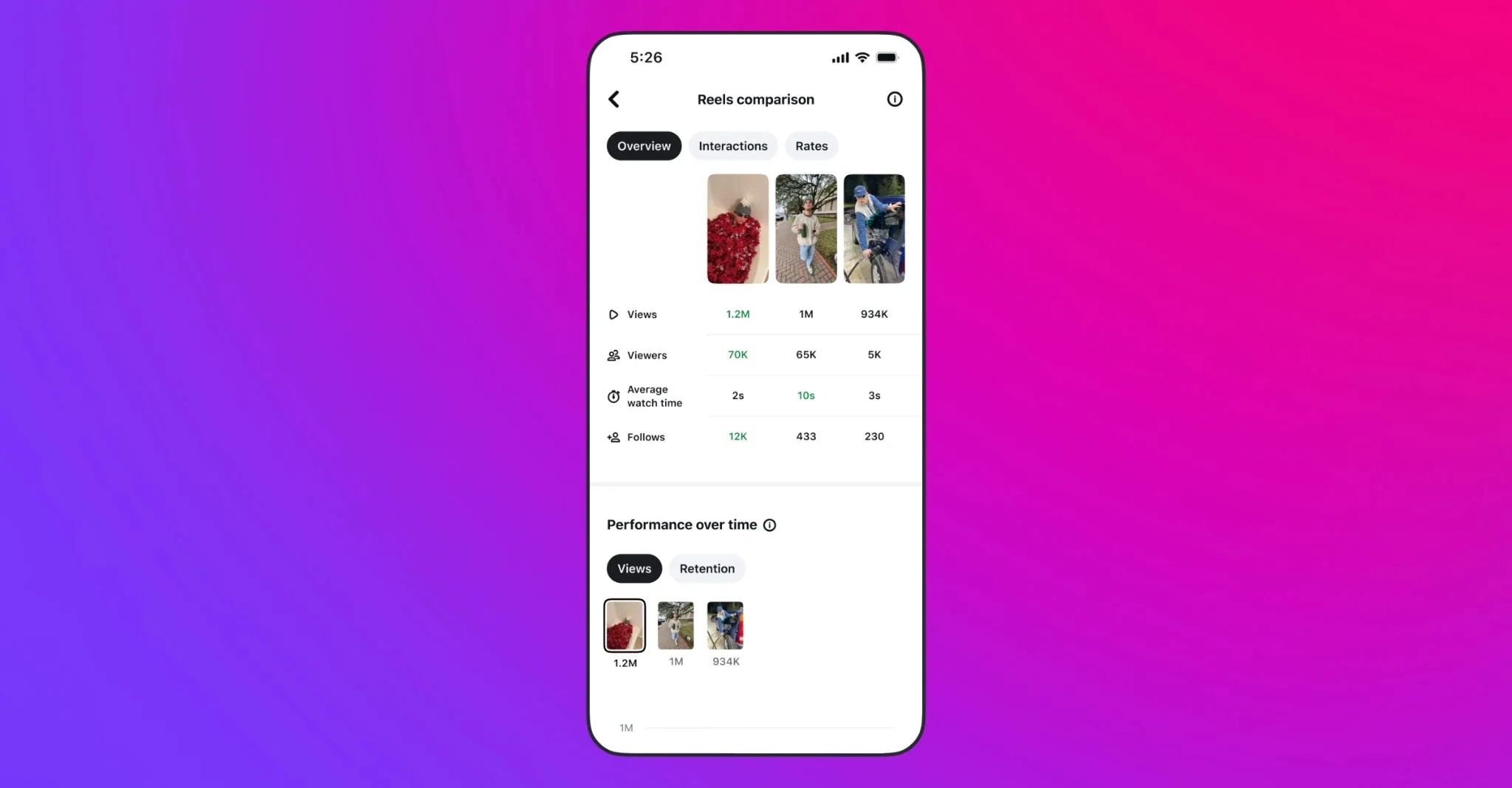
Read the four metrics as different signals
Views show distribution, not approval
A view count tells you how often playback met Instagram's counting rule. It does not tell you whether people understood the post, watched long enough to reach the point, or wanted more from the account.
Watch time tests the opening and pacing together
Use watch time to inspect where attention may have weakened, then watch the Reel yourself. Check whether the first seconds explain the subject, whether text arrives in time, and whether the middle repeats information.
Follows connect the post to the profile promise
A Reel can earn plenty of views while giving no reason to follow. If one post brings more follows, compare its topic and promise with the bio, pinned posts, and the rest of the grid. The profile should continue the reason that brought the viewer there.
Interactions need context
Comments, likes, shares, and saves represent different actions. A tutorial may be saved for later while a joke is sent to a friend. Compare like with like before deciding that one interaction pattern is better.
Turn the comparison into one next edit
Write a one-sentence observation that names what the tool shows and what you saw in the videos. For example: “The two shorter tutorials held more watch time, and both showed the finished result in the opening shot.” That observation supports a small test: keep the next topic comparable and show the result before the explanation.
Avoid claims the screen cannot support. “Short Reels always perform better” reaches far beyond three posts. So does “the algorithm prefers this color” when the videos differ in subject and distribution. Keep the conclusion attached to the account, period, and Reels you compared.
A simple comparison note
- Question
- Which opening made the subject clear sooner?
- Evidence
- Views, watch time, follows, interactions, plus the opening five seconds of each Reel.
- Observation
- Name the metric difference and the visible edit difference without claiming causation.
- Next test
- Change one opening choice while keeping the topic and format reasonably close.
Use Audience and Inspiration as separate inputs
The same August update added an Audience section with follower locations, interests, and active times. Instagram also says you can export video insights as a PDF for a brand or partner. Treat the PDF as a record of the available metrics, not proof of a campaign result that the report does not measure.
Edits also added search to the Inspiration tab for audio, ideas, and templates around a topic. Use it after you have a question from your own comparison. Searching for a format that could solve a specific pacing or explanation problem is more useful than copying whatever appears popular.
Questions about comparing Reels in Edits
How many Reels can I compare in Edits?
The Edits comparison tool lets you select up to three Reels and view their metrics side by side.
Which Reel metrics appear in the comparison?
Instagram lists views, watch time, follows, and interactions in the comparison. The available detail still depends on the account and the data Instagram has recorded.
Does a higher metric prove which edit caused the result?
No. A side-by-side comparison shows differences in results, but it does not isolate the cause. Topic, audience, timing, distribution, cover, opening, length, and edit can all differ.
Can I export Edits audience insights?
Instagram says the Edits Audience section shows follower location, interests, and active times, and includes an option to export video insights as a PDF for brands or partners.
Keep improving
Related Instagram guides
Reels analytics guide
Instagram Reels Insights
Separate Reel views, viewers, watch time, average watch time, and follows, then use the numbers to inspect one creative choice at a time.
Read guide →Series planning guide
Instagram Content Series: Plan a Repeatable Format
Build a four-post Instagram series around one clear promise, a repeatable structure, and evidence from your own account.
Read guide →Reels experiment guide
Instagram Trial Reels
Test a new Reel with non-followers first, read the early signals, and decide whether it belongs on your main profile.
Read guide →