Desktop editing guide
Instagram Edits Desktop: Mac Workflow and Current Limits
Instagram Edits now has a free Mac app for Apple silicon. Use it when a Reel needs a multi-track timeline, accurate audio cuts, color work, imported fonts or LUTs, or a 4K watermark-free export. Keep one limit in view: Mac projects are currently separate from Edits projects on Android and iPhone.
Published and reviewed by the Roastagram team ·
What you need before downloading it
- A compatible Mac: the current desktop release requires Apple silicon, M1 or later.
- An Instagram account: Edits uses Instagram sign-in and can publish without leaving the app.
- A separate project plan: a project started on Mac will not appear in Edits on Android or iPhone yet.
Sources: Edits on desktop, November 5, 2026, and the official Mac download page, checked November 6, 2026.
Build the rough cut on a timeline you can inspect
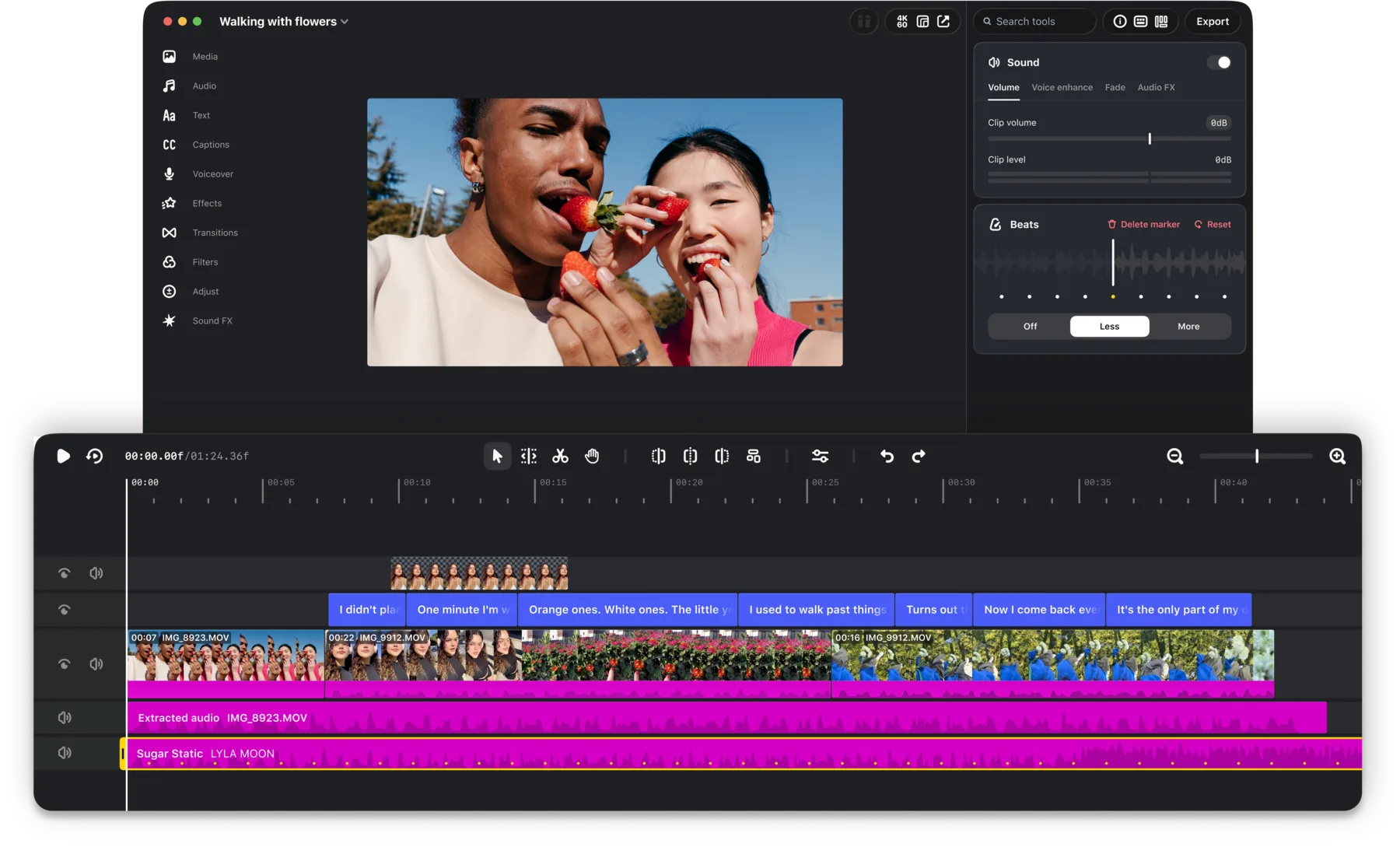
The Mac app gives video, text, music, sound effects, and other layers room to breathe. Its multi-track timeline shows overlaps and gaps that are easy to miss on a phone. Audio waveforms help place a cut on a beat or remove a pause without dragging against a tiny strip of pixels.
Start with the story rather than the effects. Put the essential clips in order, remove repeated setup, and watch the sequence once without text. Add captions, music, and graphics after the picture cut makes sense. Custom keyboard shortcuts can match commands you already use in another editor.
Use the desktop controls where precision matters
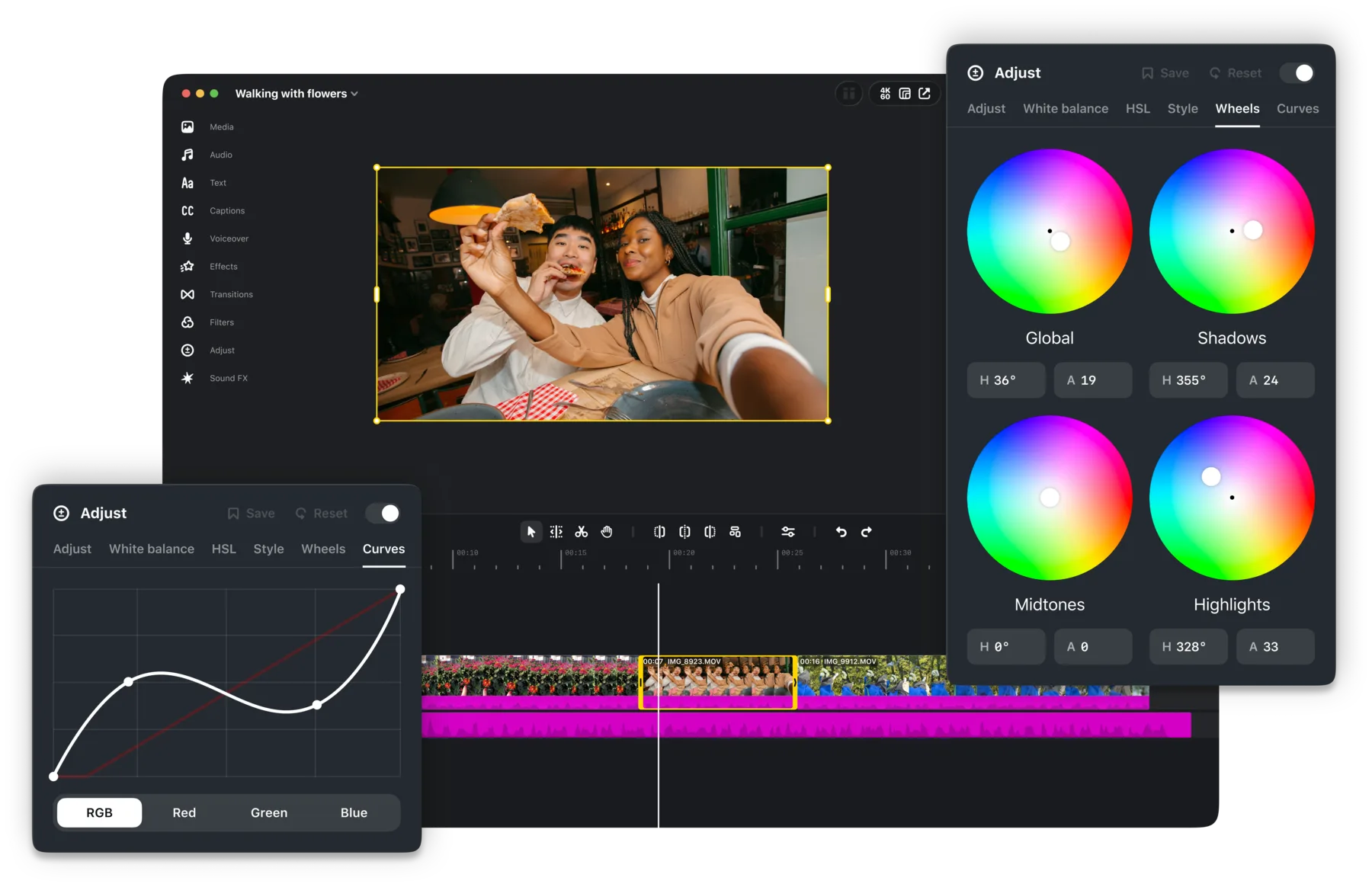
Edits for Mac includes keyframes, color wheels, curves, log conversions, and precise audio waveforms. You can import LUTs and font files, then save a repeatable treatment for a series. Instagram's licensed and royalty-free audio libraries are built in, along with automatic captions in multiple languages.
Color controls deserve a restrained pass. Correct exposure and white balance first. Apply a LUT only after checking what it does to skin, product colors, and bright highlights. Review captions at normal phone size, even though you edited them on a large display.
Protect the project before you move devices
Instagram's Help Center says projects in Edits for Mac are separate from projects in Edits for Android or iPhone. Saved mobile audio and text styles may appear on desktop, but that does not make the underlying edit portable.
Finish the active edit on the device where it began. If you need phone footage on the Mac, transfer the original files before starting the desktop project. Keep those originals until the Reel is published and checked. An exported video is separate from the project, so later timeline changes require a fresh export.
Workflow details: Instagram Help Center, checked November 6, 2026.
Export once, then check the published Reel
- Watch the full timeline and listen once with headphones.
- Check horizontal and vertical framing for the destination you chose.
- Export up to 4K with no watermark, or choose direct Instagram sharing.
- When sharing directly, set the cover, caption, location, tags, audience, and Trial reel option deliberately.
- Open the published Reel on a phone and inspect captions, crop, audio, and cover.
Direct publishing removes a transfer step, but it does not replace the final check. The profile grid still crops the cover, and viewers still watch on smaller screens and varied connections.
Instagram Edits desktop questions
Is Instagram Edits available on desktop?
Yes. Instagram released Edits for macOS on November 5, 2026. The first release requires a Mac with Apple silicon, M1 or later.
Do Edits projects sync between Mac and mobile?
No. Instagram's Help Center says Mac projects are separate from projects created on Android or iPhone. Instagram says it is working on editing one project across desktop and mobile.
Can Edits for Mac publish directly to Instagram?
Yes. The Mac app can share a Reel directly to Instagram with a cover, caption, location, people tags, audience choice, and the Trial reel option.
Does Edits for Mac add a watermark?
No. Instagram says the Mac app exports up to 4K without a watermark and supports horizontal and vertical aspect ratios.
Keep improving
Related Instagram guides
Edits workflow comparison
Edits Desktop vs Mobile
Compare Edits on Mac with Edits on iPhone and Android, including project separation, capture, timeline control, export, sharing, and the safest handoff between devices.
Read guide →Reels workflow guide
How to Make Instagram Reels in 2026
Plan, record, edit, cover, and publish an Instagram Reel around one clear idea using Instagram's current tools and limits.
Read guide →Edits quality guide
Best Instagram Reel Quality Settings for Edits
Use Instagram's current Edits camera and export controls to record sharp Reels, choose resolution, frame rate, SDR or HDR, and share without an avoidable extra export.
Read guide →